Connect Claude to Zotero
Connect Claude to Zotero using the free desktop extension or hosted access. Platform downloads, embedding setup, PDF checks and your first verified passage.
Zoteus is an open-source MCP server that gives Claude access to your Zotero library. Once it is connected you can ask Claude to find the paper you saved three years ago, quote the passage from its PDF with the page number, build a bibliography in the style your journal wants, or file a new reference by its DOI. References come from your library, but you still need to verify each passage and the conclusions drawn from it.
There are five ways to connect. Pick the one that matches where you use Claude; plenty of people run two.
| Where you use Claude | What to do | Cost |
|---|---|---|
| The Claude Desktop app | Double-click the extension file | Free |
| claude.ai in a browser, or the Claude mobile apps | Add the hosted connector | From €7/month |
| Claude Code in a terminal | One claude mcp add command | Free |
| Cursor, VS Code, Zed, Codex | One npx add-mcp command, or a JSON snippet | Free |
| ChatGPT (web) | Hosted connector or self-hosted remote, needs Developer mode | From €7/month hosted, or free if you self-host |
Before you start
You need a Zotero library. If you already use the Zotero desktop app, you are ready.
For the three routes that run Zoteus on your own computer (Claude Desktop, Claude Code and Cursor), let Zoteus talk to the Zotero app on your computer. This takes fifteen seconds and removes the need for an API key in most cases:
- Open Zotero.
- Go to Settings, then Advanced.
- Tick "Allow other applications on this computer to communicate with Zotero".
- Leave Zotero running while you chat with Claude.
With that switched on, Zoteus reads your library, your notes and the text of your PDFs straight from the app, and writes the things that have a desktop path (adding items by identifier, attaching files, highlighting PDFs, moving items to the trash and restoring them) without any cloud key. On Zotero 10 and newer the app asks once whether to allow writes; choose Always Allow. Metadata edits, tags, collections, group libraries, sync, and anything you do while Zotero is closed go through the Zotero Web API and need a key. See Do you need a Zotero API key? below.
Claude Desktop
See the current release download page
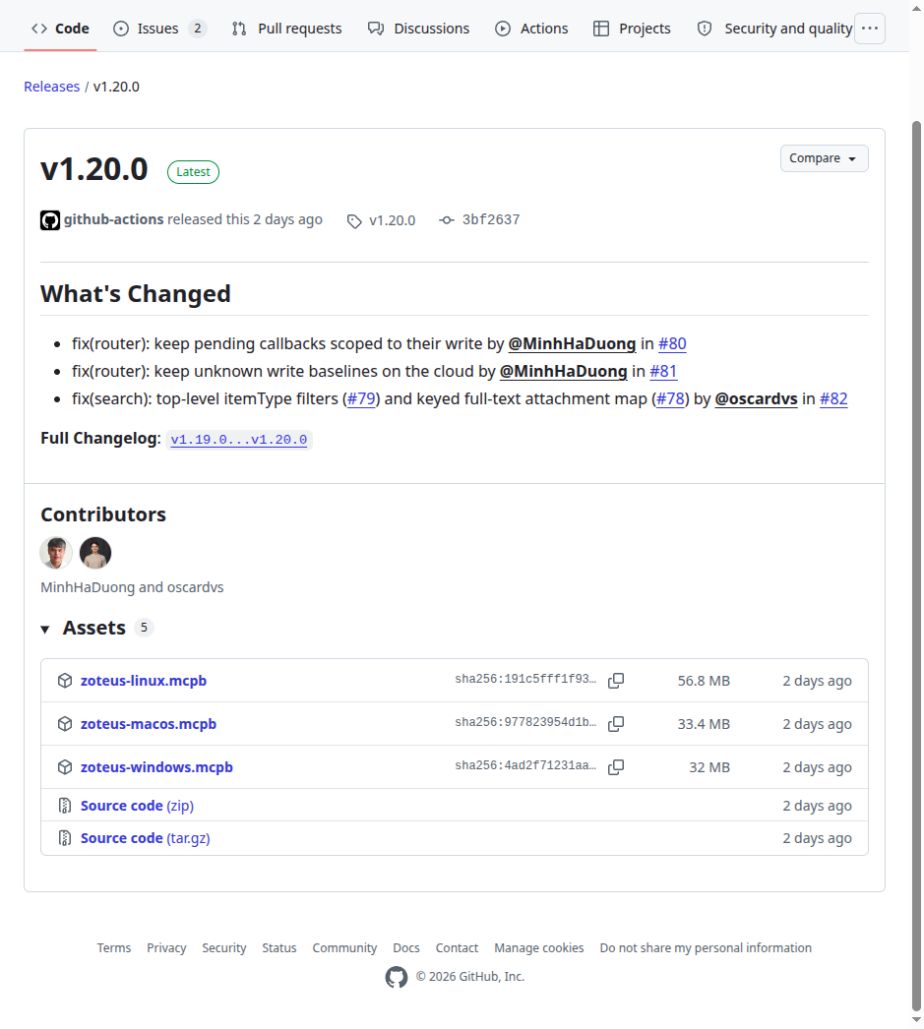
Captured 14 September 2026 in a desktop browser on Linux. These are release assets, not proof of installation on each platform.
The Claude Desktop app installs the core connector from one file, with no terminal. Search by meaning needs an additional embedding setup; keyword lookup and PDF reading do not. The bundle carries its own copy of Zoteus and runs on the Node.js built into the Claude app, so you do not need Node.js or Python installed.
- Download the extension. Go to the latest release and click the bundle for your system in the Assets list:
zoteus-macos.mcpb,zoteus-windows.mcpborzoteus-linux.mcpb. The v1.20.0 bundles are about 34 to 60 MB, depending on platform. Check that the download comes from the project's own release page. - Install it. Double-click the downloaded file. The Claude app opens, shows what Zoteus can do, and you click Add. If double-clicking does nothing (on Linux, or where the file type is not registered), open the Claude app, go to Settings, then Extensions under Desktop app, and drag the downloaded file onto the panel that says Drag .MCPB or .DXT files here to install.
- Restart Claude properly. Closing the window is not enough. Quit the whole app (Cmd-Q on macOS, File, Exit on Windows) and open it again.
- Check it worked. Start a new chat and ask: Am I connected to my Zotero library? Claude answers with a line that starts Signed in as ... or No cloud API key configured, running in local-only read mode, and says whether it can see the Zotero app on your computer. Either answer means Zoteus is installed.
To add an API key later, open Settings, then Extensions, click Configure next to Zoteus, and paste it into the Zotero API Key field. For search by meaning, also follow embedding setup and readiness. The default local provider name does not mean the model is installed.
Updates are not automatic
An extension installed by hand does not update itself. Turn on Check for updates in the Zoteus settings (it is off by default) and Zoteus asks GitHub once a day, then tells you in chat when a newer version exists. Updating is the same two steps: download the new bundle for your system, install it over the old one. Your settings stay where they are.
If you would rather run Zoteus through npx in Claude Desktop (for example to pin a version), install Node.js 20.19 or newer, open Settings, Developer, Edit Config, and add this to claude_desktop_config.json:
{
  "mcpServers": {
    "zoteus": {
      "command": "npx",
      "args": ["-y", "@oscardvs/zoteus"],
      "env": { "ZOTERO_API_KEY": "PASTE_YOUR_KEY_HERE" }
    }
  }
}
If you have no key and Zotero is running on the same computer, remove the "env" line and the comma after the "args" array so the JSON stays valid. Merge this entry into existing settings rather than overwriting other connections. Then quit and reopen the app.
claude.ai
claude.ai connects to MCP servers from Anthropic's cloud, not from your device, so it cannot reach the Zotero app on your computer. What it can reach is a server on the public internet. Zoteus runs one at https://mcp.zoteus.com/mcp: you sign in with your own Zotero account, and Claude sees your library through Zotero's online API. The same connector then works in the Claude desktop and mobile apps, on any device where you are signed in.
The hosted connector is a subscription, because a maintained server costs money to keep online: €69 a year or €7 a month for one person, €99 a month for a lab of up to ten on a shared group library. Everything on this page that runs on your own machine stays free, with every feature. Details on the pricing page.
-
Subscribe at zoteus.com/pricing. Checkout is handled by Polar and you receive a licence key by email.
-
In claude.ai, open Settings (called Customize on some plans), then Connectors, then Add custom connector. On a Team or Enterprise plan an organisation owner adds it under Organization settings, Connectors.
-
For the URL, enter exactly:
https://mcp.zoteus.com/mcp -
Click Add, then Connect. Your browser goes to Zoteus's sign-in page, where you paste the licence key once, and then to zotero.org, which asks whether to give Zoteus access to your library. Approve it and you land back in Claude.
-
Start a chat and ask Am I connected to my Zotero library?
Custom connectors are available on every claude.ai plan; Free plans are limited to one custom connector.
Before subscribing
Check hosted requirements and limits: client access, synced PDF availability, which libraries you want indexed, and the provider/coverage your research needs. Metadata sync alone does not make local-only or WebDAV file bytes readable. Zoteus does not include a separate AI subscription.
Before you decide. The hosted connector reaches your library through your Zotero account online, so anything you have not synced to Zotero's servers is invisible to it, and PDFs that live only on your own disk stay out of reach. If most of your reading is annotated PDFs on one computer, the free Claude Desktop extension is the better tool. Many people run both: the extension at their desk, the hosted connector everywhere else. If you would rather host the connector yourself, the same OAuth remote is in the open-source package: see Remote OAuth.
ChatGPT
Use the ChatGPT connection guide. It covers Developer mode, supported accounts, the hosted connector or a self-hosted HTTPS remote, and your first verified passage. ChatGPT cannot run the local extension described above.
Claude Code
Claude Code needs Node.js 20.19 or newer, which it uses to fetch and run Zoteus through npx. One command registers the server:
claude mcp add --transport stdio zoteus -- npx -y @oscardvs/zoteusWith a Zotero API key:
claude mcp add --transport stdio zoteus -e ZOTERO_API_KEY=xxxxx -- npx -y @oscardvs/zoteusAdd -s user to make Zoteus available in every project rather than only the current directory. Inside Claude Code, run /mcp to confirm that zoteus is connected, then ask something like search my Zotero library for papers about urban heat islands. Manage it with claude mcp list, claude mcp get zoteus and claude mcp remove zoteus. To explicitly request the latest published version, use @oscardvs/zoteus@latest; an unversioned invocation can reuse a cached package.
Subscribers can also use the hosted connector from the terminal. Claude Code runs the OAuth flow itself:
claude mcp add --transport http zoteus https://mcp.zoteus.com/mcpThen run /mcp, select zoteus, choose Authenticate, and complete the sign-in in the browser that opens.
Cursor
Cursor, VS Code, Zed, Codex and the other editors that speak MCP have no one-click installer, so you point them at Zoteus in their settings. You need Node.js 20.19 or newer. The quickest route is the universal installer, which writes the entry into whichever of these clients it finds:
npx add-mcp @oscardvs/zoteusFor Cursor specifically, you can instead add the server by hand. Create .cursor/mcp.json in your project for a project-specific server, or ~/.cursor/mcp.json in your home directory for one available everywhere:
{
  "mcpServers": {
    "zoteus": {
      "command": "npx",
      "args": ["-y", "@oscardvs/zoteus"],
      "env": { "ZOTERO_API_KEY": "PASTE_YOUR_KEY_HERE" }
    }
  }
}
If you have no key and Zotero is running on the same computer, remove the "env" line and the comma after the "args" array so the JSON stays valid. Merge this entry into existing settings rather than overwriting other connections. Cursor also accepts an install link that carries the same configuration: Add Zoteus to Cursor. Either way, Zoteus then appears in Cursor's MCP settings, where you can switch it on and off.
First successful research task
Find a known paper, retrieve a passage and verify its page. Check search readiness before interpreting a missing semantic hit as missing evidence.
What to ask next
- Search my library for papers about urban heat islands.
- Which papers in my library argue against open-plan offices? Quote the passage and give me the page.
- Format a bibliography of the five most relevant papers in APA style.
- Add this paper to my Zotero library by DOI: 10.1038/s41586-021-03819-2.
The second question can use search by meaning to locate candidates, followed by passage retrieval. The first time you ask for it, Zoteus reads through your library and builds an index; on a large library that takes a while, once. Keyword search works immediately. On-device vector search needs one extra package outside the Claude Desktop bundle; see Semantic Search.
Do you need a Zotero API key?
Usually not. A key lets Zoteus reach your library through Zotero's servers instead of through the app on your computer.
| What you want to do | Key needed? |
|---|---|
| Search, read, and quote your own library, with Zotero running | No |
| Add items by DOI, attach files, highlight PDFs, trash and restore, with Zotero running | No |
| Read a group library the app already holds (Zotero 10 and newer) | No |
| Edit metadata, tags or collections | Yes |
| Sync, or change a group library | Yes |
| Anything at all while Zotero is closed | Yes |
| Use the hosted connector | Not a key you create: you sign in to Zotero instead |
To create one: go to zotero.org/settings/keys, click Create new private key, name it, tick Allow library access, tick the write boxes only if you want Claude to change items through the key, and copy the key when it is shown (Zotero shows it once). Treat it like a password; you can delete it from the same page at any time.
When something goes wrong
| What you see | What to do |
|---|---|
| Claude does not seem to know about Zotero | Quit the app completely and reopen it. Closing the window does not reload extensions or MCP servers. |
npx: command not found | Node.js is missing or not on the path. Install the LTS version from nodejs.org and fully restart the app. |
| Claude cannot read your library and you have no API key | Check that Zotero is open and that Settings, Advanced, "Allow other applications on this computer to communicate with Zotero" is ticked. |
| The first search by meaning takes a long time | Expected on a big library. The index is built once and kept. |
| Something else | Open an issue with what you tried and what you saw. Claude Desktop logs live in ~/Library/Logs/Claude (macOS), %APPDATA%\Claude\logs (Windows) or ~/.config/Claude/logs (Linux); read main.log. Remove your API key from anything you paste. |
Next
-
Group libraries for systematic review teams, for a shared library.
-
Zoteus and zotero-mcp, if you are choosing between the two open-source servers.
-
Configuration, every setting in full.
Frequently asked questions
Is Zoteus only for editing my library, or can it read my PDFs?
Zoteus reads first. In Claude it searches your Zotero library by keyword or, once embeddings are set up, by meaning, returns passages from your PDFs with page numbers, shows PDF pages and figures as images, and finds your own notes and PDF annotations. It also writes: Zoteus adds items by DOI or arXiv id, tags and files items and highlights passages in PDFs. Removing an item moves it to the Zotero trash, where you can restore it, and permanent deletion stays off unless you turn it on.
Is there a free version of Zoteus?
Yes. Zoteus is open-source under the MIT licence and free with every feature when it runs on your own computer, in the Claude Desktop extension, Claude Code or Cursor. claude.ai in the browser and the Claude mobile apps need a remote connector instead: the hosted Zoteus connector costs €69 a year or €7 a month for one person, or €99 a month for a lab of up to ten, and you can self-host the same OAuth remote for free. Zoteus does not include a Claude subscription.
Do I need to install anything?
For Claude Desktop, one file: download the Zoteus extension for macOS, Windows or Linux from the latest GitHub release and double-click it. It carries its own copy of Zoteus, so you do not need Node.js or Python. Claude Code and Cursor need Node.js 20.19 or newer and one command. With the hosted connector in claude.ai there is nothing to install: you add https://mcp.zoteus.com/mcp as a custom connector and sign in with your Zotero account.
Does Zoteus work with Zotero group libraries?
Yes. Zoteus lists the group libraries your Zotero account belongs to, and you name the group in your request so Claude searches, quotes and tags there. With the Zotero desktop app running (Zotero 10 and newer), Zoteus reads a group the app already holds without an API key; changing a group library needs a Zotero API key with write access to that group, or the hosted connector, where your Zotero group role decides what you can do.
Can Claude cite page numbers from my Zotero PDFs?
Yes. Zoteus returns each passage from a PDF with its page number and the nearest heading, so Claude can quote it with the page, and it formats bibliographies with citeproc-js in any CSL style, such as APA, Vancouver or Chicago. Zoteus can also highlight the quoted passage in the PDF, so you can find it in Zotero and check it against the page before you rely on it.
How is Zoteus different from zotero-mcp?
Zoteus and 54yyyu/zotero-mcp are both open-source MCP servers for Zotero. zotero-mcp is a Python project; Zoteus runs on Node.js or as a one-click Claude Desktop extension that needs neither Node.js nor Python, and it also offers a maintained hosted connector for claude.ai and ChatGPT. Zoteus focuses on verifiable reading: PDF passages with page locators, PDF pages as images, citations in any CSL style, and retrieval of your own notes and annotations. See the dated comparison of Zoteus and zotero-mcp.
Verification notes
Instructions reviewed 14 September 2026 against Zoteus v1.20.0 and Anthropic connector guidance. Web setup uses the current browser interface, which has no fixed client version. Release assets were checked for macOS, Windows and Linux. End-to-end authenticated installation was not repeated on all platforms; menu labels and workspace permissions can vary.
Get started with Zoteus
Choose Claude or ChatGPT, connect a hosted or free local Zotero library, and verify your first PDF passage. Setup, search readiness and troubleshooting.
Connect ChatGPT to Zotero
Connect ChatGPT to Zotero with a hosted or self-hosted remote. Check Developer mode, PDF availability and permissions, then verify your first passage.